Phonic Docs
  • Tutorials
  • Docs
  • Contact

›Survey Components

Tutorials

  • How to Create an Audio Survey
  • Embed Microphone in a Webpage
  • Embed a Full Survey
  • Integrate With Decipher
  • Integrate With Qualtrics

Survey Components

  • Question Types
  • Stimuli
  • Timers
  • Randomization
  • Survey Logic
  • Duplicating Surveys & Questions
  • Deleting Data

Collaboration

  • Sharing and Exporting
  • Email Notifications

Analytics

  • Analytics
  • Transcription
  • Data Visualization
  • Google Analytics

Stimuli

Stimuli can be added to any question type in the survey builder. This feature allows you to attach an image, audio clip, video or link to a question. Simple click on “Add Media” and use the drop down menu to select an option.
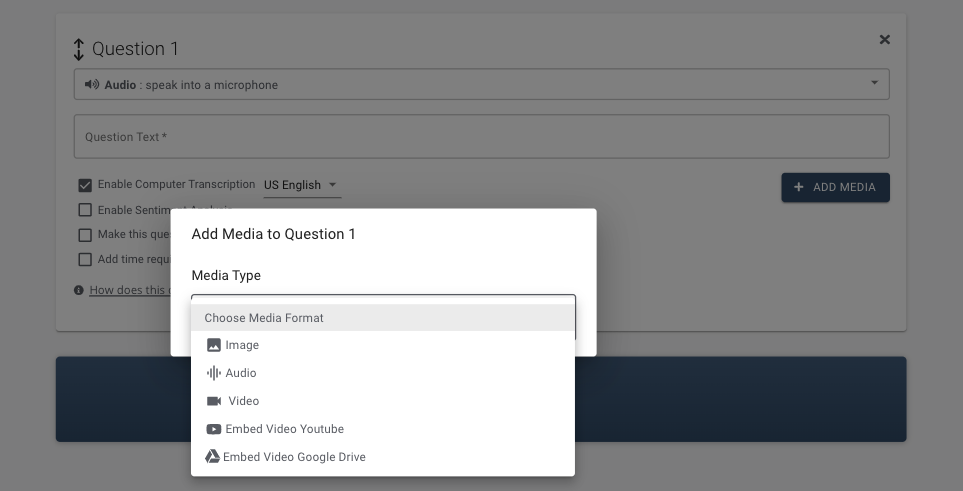
adding a stimuli to a new quetion

Stimuli refers to any image, audio, or video clip that is shown with a question response. All major image, audio, and video types are supported. Stimuli may be uploaded directly to Phonic or linked from Youtube or Google Drive.

A Timer can be added to ensure the entirety of a video or audio clip is viewed.

← Question TypesTimers →
Phonic Docs
Tutorials
Create An Audio SurveyCreate An Embedded SurveyIntegrate with Other Platforms
Docs
Question TypesStimuliTimers
-
Follow @PhonicAI
Copyright © 2021 Phonic Inc.