
Embed Microphone in a Webpage
Phonic offers the ability to embed a single Phonic microphone inside of an existing web page. The basic code needed to make this happen is shown below. Simply change the survey ID and question ID to those which match the survey/question combination you want to store the results.
<phonic-mic
  surveyid="paste-survey-id"
  questionid="paste-question-id">
</phonic-mic>
<script type="text/javascript" src="https://api.phonic.infillion.com/phonic-embed.min.js">
</script>
Sample Recorder
The recorder below is what you'll see by default with the code snipper above. This sample is hooked up to a demo Phonic survey.
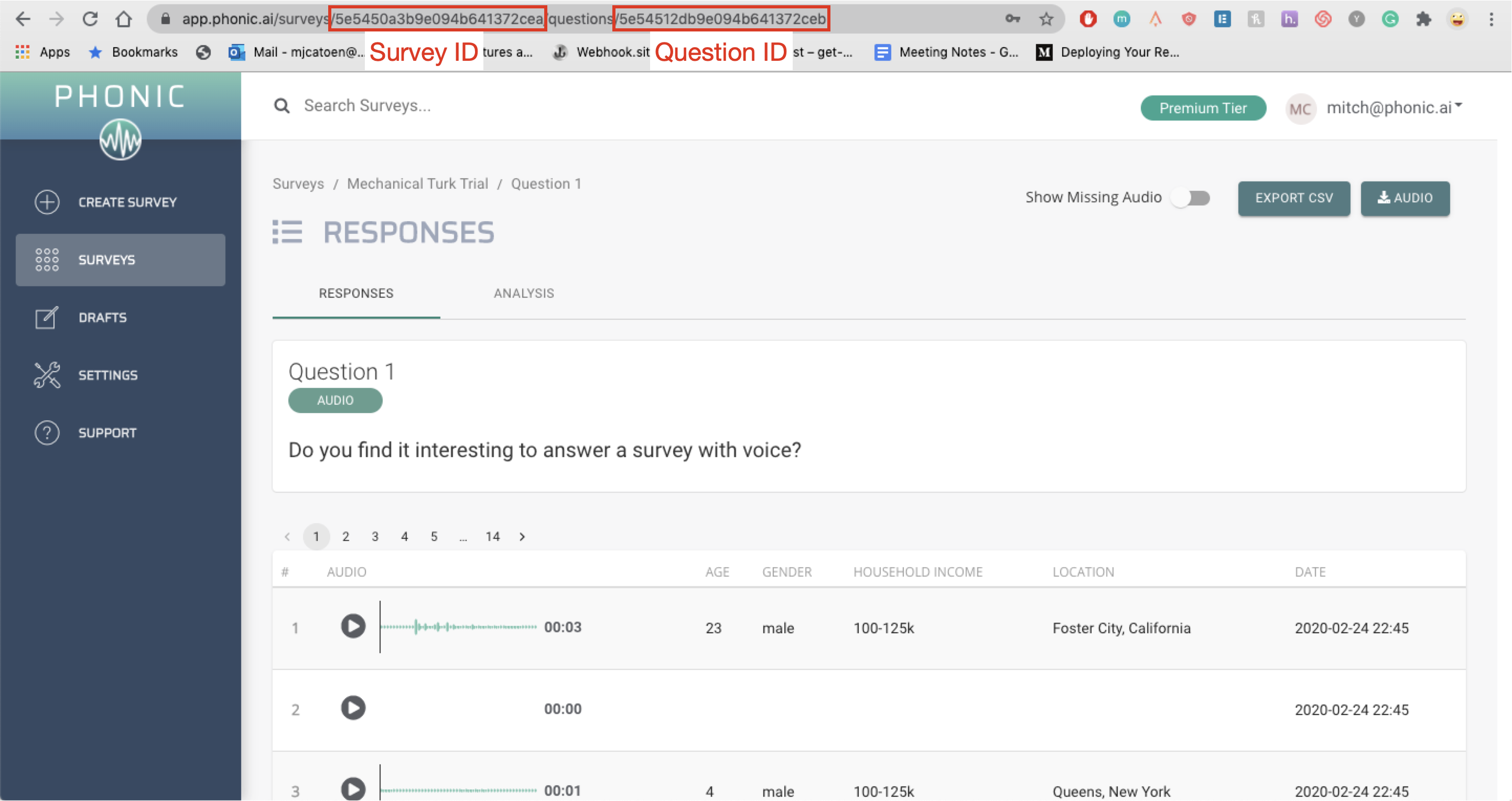
Where to find survey ID and question ID
Each Phonic survey & question has its own unique identifier. When using Phonic embedded it's important that the correct survey and question IDs are used to assure seamless upload to the right place. You can find these ID's in the URL when you visit the question page in the Phonic dashboard.
Customizing Styles
The size, theme & prompt attributes can all be customized.
- size can be set to either
large(default) orsmall. - theme can be set to either
square(default) orround. - prompt can be optionally included to include a question prompt above the recorder.
- spacing can be added above and below the recorder by specifying a CSS attribute, ex.
spacing="10px".
Customizing Behaviour
- backupText can be set either
trueorfalseto enable a backup text box as an alternative to recording audio. - audioRecordingFormat can be set to either
WAVorMP3. - startRecordingImmediately begins recording immediately. This is only available for WAV (not MP3).
- autoSubmit submits immediately after someone clicks record.
- micCheck can be set
trueto let respondents verify their microphone works without submitting a response. - showCounter can be set to
trueto display a timer counting up during recording. - platform can be set either
decipherspss,qualtrics, or left blank.
Customizing Text
labelFormat can be set to
custom, enabling all other labels to be modified as well:- recordText, the default of which is "Record".
- rerecordText, the default of which is "Re-Record".
- submitText, the default of which is "Submit".
- doneText, the default of which is "Done!".