Phonic Docs
  • Tutorials
  • Docs
  • Contact

›Survey Components

Tutorials

  • How to Create an Audio Survey
  • Embed Microphone in a Webpage
  • Embed a Full Survey
  • Integrate With Decipher
  • Integrate With Qualtrics

Survey Components

  • Question Types
  • Stimuli
  • Timers
  • Randomization
  • Survey Logic
  • Duplicating Surveys & Questions
  • Deleting Data

Collaboration

  • Sharing and Exporting
  • Email Notifications

Analytics

  • Analytics
  • Transcription
  • Data Visualization
  • Google Analytics

Duplicating Surveys & Questions

Duplicating A Survey

If you wish to duplicate an existing survey, click on the survey menu icon and select “Duplicate Survey”. This will generate an identical survey draft which can be edited without modifying the original. Survey responses are not duplicated.
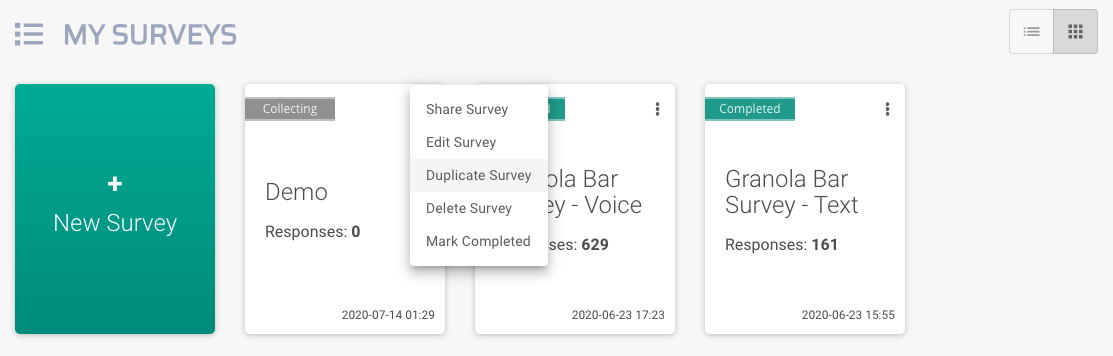
duplicate survey screenshot

Duplicating A Question

Questions can be duplicated in a similar manner to surveys. When creating questions for your survey, click on the menu icon in the top right of the question box. This will prompt a drop down menu with the option to duplicate a question.
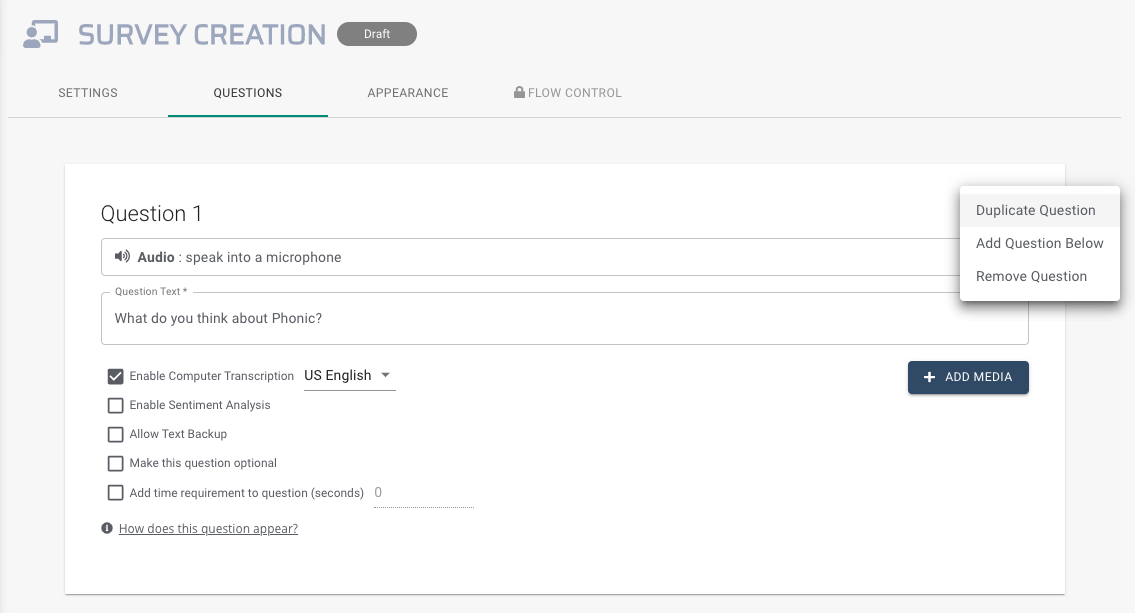
duplicate question screenshot

← Survey LogicDeleting Data →
Phonic Docs
Tutorials
Create An Audio SurveyCreate An Embedded SurveyIntegrate with Other Platforms
Docs
Question TypesStimuliTimers
-
Follow @PhonicAI
Copyright © 2021 Phonic Inc.